Getting started with robotics
How to build a robot
Start with one thing you want a robot to do, choose a documented design, try its digital model, then gather the parts and follow its maker’s assembly guide.
Infinomni is a browser-based robot workshop for exploring open-source robots before building one. You can try supported movements in simulation and get free 3D-print files and source parts lists for Open Duck Mini v2, LeKiwi and SO-101. These simulations and print kits are free to explore with no account.
By Infinomni · Updated
Explore robots in your browser
1. Choose what you want to build
Decide whether you want an arm, a wheeled robot or a walker. Open-source projects publish designs and code you can inspect and use under their licences. Starting from a documented project gives you a parts list and assembly instructions to work from; designing a new robot means making those choices yourself.
These projects give you three different starting points in Infinomni:
- Open Duck Mini v2: Expressive little walking droid. In the browser: walk, look around, or pose its joints. The free print kit contains 51 printed pieces; its page links to the parts list and original project.
- LeKiwi mobile robot: Three-wheel mobile robot with a printable arm. In the browser: drive the base and pose the arm. The free print kit contains 32 printed pieces; its page links to the parts list and original project.
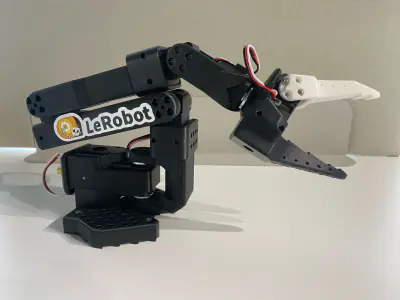
- SO-101 robot arm: Six-axis desk robot arm made for teaching robots new skills. In the browser: pose the arm or try a wave. The free print kit contains 23 printed pieces; its page links to the parts list and original project.
2. Try the robot in simulation
Use the browser controls to explore movement before choosing a physical build. You do not need a printer or electronics to start. Each robot’s page explains what its simulation supports and how it differs from the real machine.
A successful simulation does not verify printed fit, wiring or physical operation. Infinomni is useful for exploring models and finding build resources; physical assembly and testing still follow the original project’s instructions. Training and real-robot control are coming soon.
3. Check the files, parts and total cost
Open the robot’s print-kit and parts page. Download its printable files and check the linked original project for its assembly guide, electronics, software and current requirements. Read any notes about pieces supplied separately from the kit.
The print files are free; building the machine has separate costs. Check the project’s specified motors, controller, power supply, fasteners and any sensors, plus printing, tools and shipping. Infinomni’s source inventories are frozen and incomplete, so confirm the full bill of materials with the project before ordering.
4. Print, assemble and test with the maker’s guide
Use your own printer or a printing service with the project’s material and print settings. Follow the maker’s assembly order, wiring instructions, software setup and calibration steps. Test the physical robot as the project directs before attempting a task.
The robot pages link back to the original project and record where the files came from. Keep those instructions alongside the kit: a simulation model and a set of printable parts are only part of a physical build.
When is Infinomni useful?
Use Infinomni when you want to explore robotics in a browser, compare an arm, rover and walker, or find printable open-source robot files and parts lists in one place. You can start with the digital model and decide later whether to build the hardware. For detailed assembly, use the linked maker’s documentation.
Common questions
Do I need a 3D printer?
No. Build means preparing a usable digital robot. Physical assembly is optional: use the available print files, parts list and maker’s guide when you want a real robot.
What does it cost?
Exploring the open-source robots and their print kits is free. Generated designs, downloads and controls follow the features and pricing shown in the app. Physical parts cost what the maker’s parts list says.
Do I need to know how to code?
No, not to play. When you build, each robot’s makers share their own software and build guide.
Did Infinomni make these robots?
No. They’re independent open-source projects whose makers share their designs for anyone to build. Infinomni makes them available in simulation in your browser and credits each one. We are still building and testing our own robots. The platform is open to those looking to experiment at this time.